A European alternative to Microsoft Word.
Dazr Docs opens, edits and saves real Word files in your browser, with tracked changes, comments, styles and page layout, also offline. Free with a Dazr account, and stored encrypted in the EU.
Free to start. No card needed.
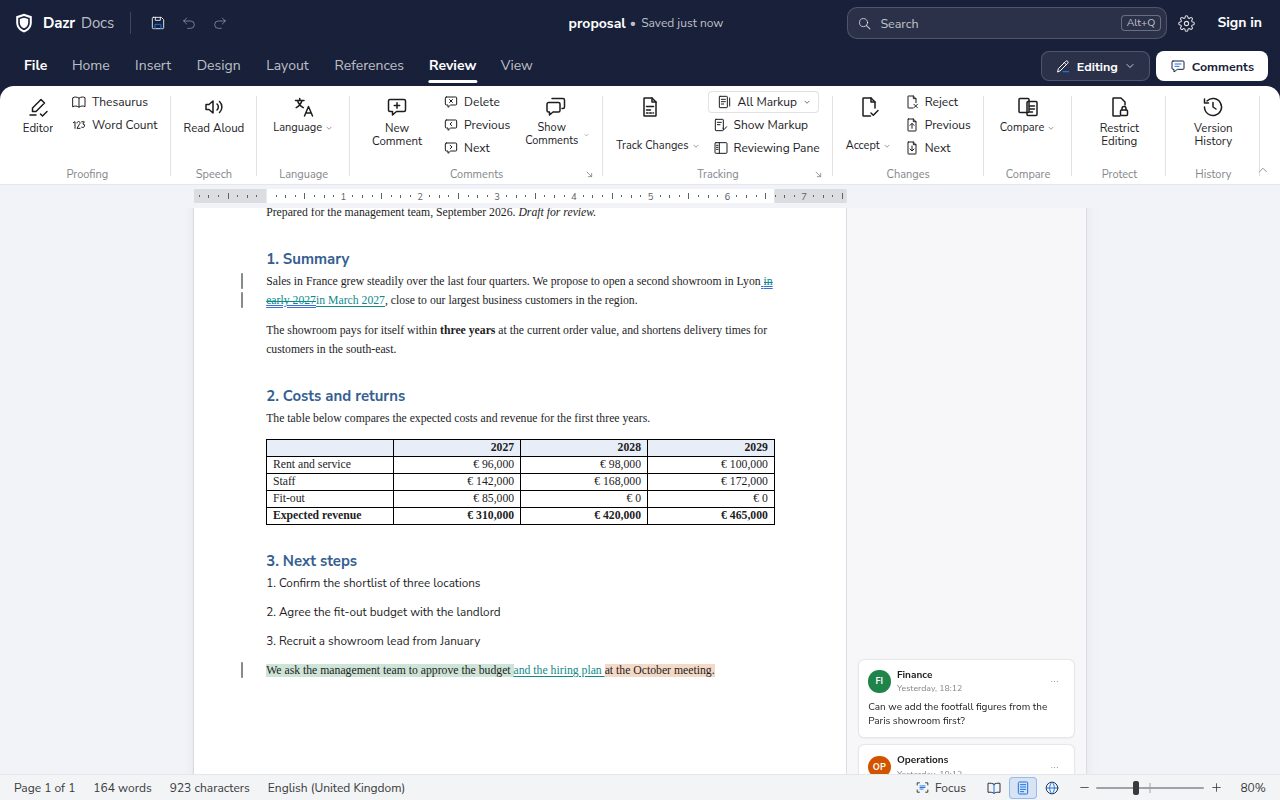
Your Word files stay Word files.
No converting, no copy and paste. Open the .docx you have and send back a .docx.
Headings, styles, tables, lists, headers and footers with page numbers, comments and tracked changes come through in .docx.
Word 97-2003 documents open with their text, formatting, tables, headers, footnotes, comments and tracked changes. Save them as .docx to keep working.
In .odt, comments, tracked changes and lists stay in place, when you open and when you save.
Save any document as a PDF, with its header, tables and page numbers.
Desktop features, in your browser.
Ready in Dazr Docs, also offline: features Word for the web leaves to the desktop app.
Mark a draft as confidential and frame the page. Word for the web can’t add any of the three.
Cite sources, build a bibliography, number your figures and index your terms. Word for the web can’t insert citations or captions.
Allow only comments, tracked changes or filling in forms, with an optional password. Word for the web opens restricted documents read-only.
See what changed between two versions as tracked changes, then accept or reject each one. Word for the web can’t compare documents.
Start with a designed cover page, and change the page layout from one section to the next. Word for the web has neither.
Save as Rich Text, Markdown, a web page or plain text. Word for the web saves as .docx, .pdf and .odt only.
Based on Microsoft’s own documentation for Word, Excel and PowerPoint for the web, checked in October 2026. Microsoft, Word, Excel and PowerPoint are trademarks of the Microsoft group of companies. Dazr is not affiliated with Microsoft.
Review together, calmly.
Every change stays visible until someone accepts it.
Insertions and deletions are marked with their author and time. Accept or reject them one by one or all at once.
Comment on any passage, reply, and resolve the thread when it is done.
Compare two versions of a document, or go back to an earlier one.
Choose File, Send for signature, and the document opens in Dazr Sign, ready for its fields.
Track changes that open in WordWrite in the same document at the same time
Dazr Docs and Microsoft Word, side by side.
As of November 2026, from each provider’s public pages. The sources are listed at the end of this page.
| Feature | Dazr Docs | Microsoft Word |
|---|---|---|
| Writing in the browser | ||
| Edit Word files for free in the browserDazr Docs with a free Dazr account. Word for the web with a free Microsoft account. | Yes | Yes |
| Free storage25 GB in Dazr Files. 5 GB in OneDrive with a free Microsoft account. | 25 GB | 5 GB |
| Keeps working offline in the browserDazr Docs opens without a connection after your first visit. Word for the web needs an internet connection. | Yes | No |
| Compare documents in the browserSee what changed between two versions as tracked changes. | Yes | No |
| Watermarks and line numbers in the browserWord has them in the desktop app only. | Yes | No |
| Where Word is ahead | ||
| An installed desktop appDazr Docs runs in your browser. Word for Windows and Mac comes with a paid Microsoft 365 plan or Office. | No | Yes |
| Run macrosDazr keeps the macros in a .docm when you save, but never runs them. | No | Yes |
| Edit charts and SmartArt in a documentIn Dazr Docs they are shown, can be moved or deleted, and are saved back exactly as they were. | No | Yes |
| Company | ||
| Company based in the EUDazr is Italian. Microsoft is American, based in Redmond, Washington. | Yes | No |
Plans and features change, so check each provider’s website before you decide.
Moving from Word.
Your documents come with you as they are.
Drag your .docx files or a whole folder into Dazr Files. A document opens in Dazr Docs with one click.
Your Microsoft 365 admin approves Dazr once. Dazr then moves everyone’s OneDrive, mail, contacts and calendars, server to server.
A document keeps the names of its fonts. Install the fonts your organisation uses, or pick one of the Dazr Suite fonts, for documents that must look exactly right.
Read the switching guideMove your company from Microsoft 365Dazr and Microsoft 365 compared
Questions and answers.
Is Dazr Docs free?
Yes. Docs, Sheets and Slides are free with a Dazr account, with 25 GB of storage. You need the free account to edit; a file shared with you to view opens without one.
Can I open a .docx without Word?
Yes. Dazr Docs opens .docx files in your browser and saves them as .docx again, with headings, styles, tables, comments and tracked changes.
Will the people I send it to see the same document in Word?
Yes. Dazr Docs saves a real .docx, with its styles, comments and tracked changes, so it opens in Word as a normal Word document. Install the fonts your organisation uses for documents that must look exactly right.
Does it work on a Mac or a Chromebook?
Yes. Dazr Docs runs in Chrome, Edge, Firefox and other modern browsers, on a Mac, a Windows PC or a Chromebook, and on your phone. Nothing to install.
Can I work without an internet connection?
Yes. After your first visit, Docs, Sheets and Slides open without a connection, with your files on your device. Changes sync when you are back.
Sources
Checked on 7 November 2026.
Microsoft and Word are trademarks of the Microsoft group of companies. Dazr is not affiliated with Microsoft.
Start your next document.
Sign in with your Dazr account and start writing.