A European alternative to PowerPoint.
Dazr Slides opens, edits and presents real PowerPoint files in your browser, with slide masters, charts, speaker notes and presenter view, also offline. Free with a Dazr account, and stored encrypted in the EU.
Free to start. No card needed.
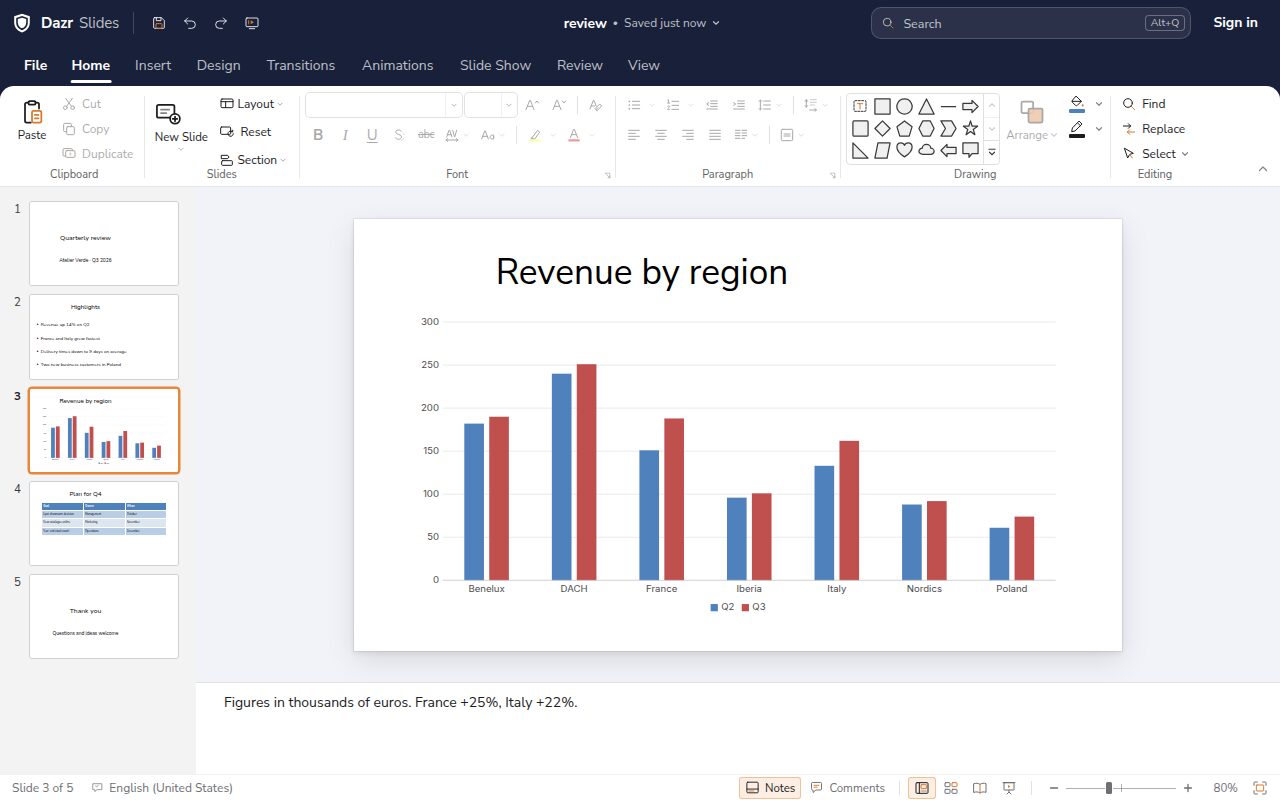
Your PowerPoint files stay PowerPoint files.
No converting, no rebuilding. Open the .pptx you have and send back a .pptx.
Slides, layouts, charts, tables and speaker notes come through in .pptx. Save as .ppsx to open straight into the show.
PowerPoint 97-2003 files open with their text, bullets, shapes, tables, pictures and speaker notes. Save them as .pptx to keep working.
In .odp, presentations keep their size, notes, tables and charts, when you open and when you save.
Export the presentation as a PDF, or as a single web page you can open in any browser.
Present with confidence.
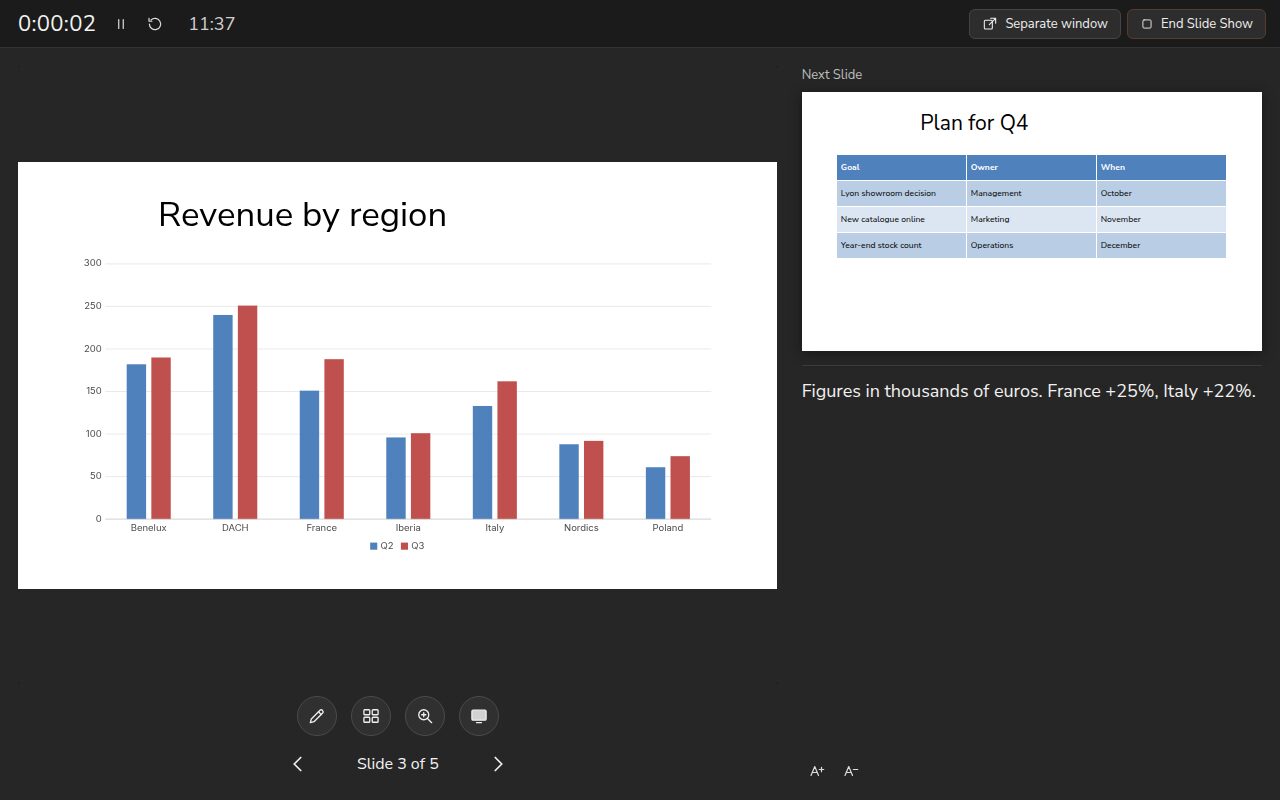
Presenter view keeps you on track.
See your notes, the next slide and a timer, while the audience sees only the current slide.
Open the audience view in its own window and move it to a projector or second screen.
Draw on a slide or zoom in on a detail during the show.
Desktop features, in your browser.
Ready in Dazr Slides: what PowerPoint for the web doesn’t have.
Change the slide master and its layouts once, and every slide follows.
Write the whole presentation as titles and bullets, then shape the slides.
Show a different set of slides to each audience, from one file. PowerPoint for the web doesn’t support custom shows.
After your first visit, Docs, Sheets and Slides open without a connection, with your files on your device. Changes sync when you are back. Word, Excel and PowerPoint for the web need an internet connection.
Based on Microsoft’s own documentation for Word, Excel and PowerPoint for the web, checked in October 2026. Microsoft, Word, Excel and PowerPoint are trademarks of the Microsoft group of companies. Dazr is not affiliated with Microsoft.
Dazr Slides and PowerPoint, side by side.
As of November 2026, from each provider’s public pages. The sources are listed at the end of this page.
| Feature | Dazr Slides | PowerPoint |
|---|---|---|
| Presentations in the browser | ||
| Edit PowerPoint files for free in the browserDazr Slides with a free Dazr account. PowerPoint for the web with a free Microsoft account. | Yes | Yes |
| Free storage25 GB in Dazr Files. 5 GB in OneDrive with a free Microsoft account. | 25 GB | 5 GB |
| Keeps working offline in the browserDazr Slides opens without a connection after your first visit. PowerPoint for the web needs an internet connection. | Yes | No |
| Custom shows in the browserShow a different set of slides to each audience, from one file. | Yes | No |
| Presenter view with notes and a timerBoth show your notes and the next slide while the audience sees only the current one. | Yes | Yes |
| Where PowerPoint is ahead | ||
| An installed desktop appDazr Slides runs in your browser. PowerPoint for Windows and Mac comes with a paid Microsoft 365 plan or Office. | No | Yes |
| Edit SmartArt and embedded objectsIn Dazr Slides they are shown on the slide and saved back unchanged. | No | Yes |
| Run macrosDazr never runs macros. Keep the original if you rely on them. | No | Yes |
| Company | ||
| Company based in the EUDazr is Italian. Microsoft is American, based in Redmond, Washington. | Yes | No |
Plans and features change, so check each provider’s website before you decide.
Moving from PowerPoint.
Your presentations and templates come with you.
Drag your .pptx files or a whole folder into Dazr Files. A presentation opens in Dazr Slides with one click.
Themes, slide masters and layouts are kept and saved back, so your company template keeps working.
Your Microsoft 365 admin approves Dazr once. Dazr then moves everyone’s OneDrive, mail, contacts and calendars, server to server.
Read the switching guideMove your company from Microsoft 365Dazr and Microsoft 365 compared
Questions and answers.
Is Dazr Slides free?
Yes. Docs, Sheets and Slides are free with a Dazr account, with 25 GB of storage. You need the free account to edit; a file shared with you to view opens without one.
Can I open a .pptx without PowerPoint?
Yes. Dazr Slides opens .pptx and .ppt files with their layouts, charts, tables and speaker notes, and saves them as .pptx.
Can I present from the browser?
Yes. Start the show from Dazr Slides, with presenter view on your screen and the audience view in its own window on a projector or second screen.
Does my company template still work?
Yes. Themes, slide masters and layouts are kept and saved back, so slides made from your template stay on brand in Dazr Slides and in PowerPoint.
Can I work without an internet connection?
Yes. After your first visit, Docs, Sheets and Slides open without a connection, with your files on your device. Changes sync when you are back.
Sources
Checked on 7 November 2026.
Microsoft and PowerPoint are trademarks of the Microsoft group of companies. Dazr is not affiliated with Microsoft.
Make your next presentation.
Sign in with your Dazr account and start with a design you like.