A calendar that keeps your day calm.
Dazr Calendar plans meetings with colleagues and clients, shares calendars with your team and keeps time for focus. Invitations from Google and Outlook just work, and everything is stored in the EU.
Included with your Dazr account, free to start.
Meetings without the back and forth.
Find a time, invite, done.
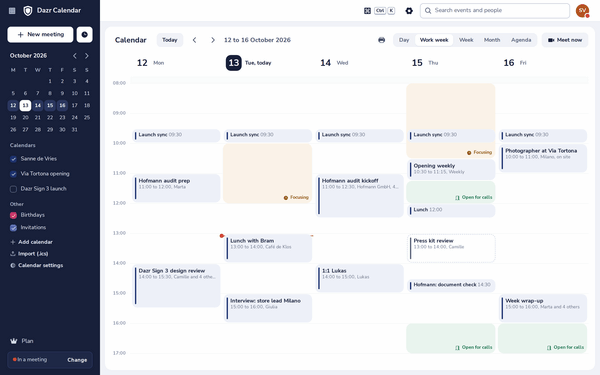
See your day next to the free and busy times of the colleagues you invite, and the next times when everyone is free.
Type any email address. People without Dazr get the invitation by email, with the meeting in a calendar file for their own calendar app.
Accept, decline or propose another time, and the meeting is in Dazr Calendar. The organiser gets a proper reply.
Every day, every week, every month or your own pattern. Change one day, or all of them.
A reminder before every meeting, 15 minutes unless you change it, also when the page is in the background.
On Starter, Pro and Enterprise, add a Dazr Teams video call to a meeting, and everyone joins from the invitation.
Time to focus.
Your calendar tells colleagues when to call, and when not.
Block time for yourself and show it as focus time. In Dazr Teams, knocks wait until you are done.
Set the hours you are open for calls. It shows next to your name in every chat.
Add the public holidays of a country, and the birthdays from Dazr Contacts, as calendars of their own.
Let clients book a time.
A booking page shows only when you are free, never what is in your calendar.
Clients pick a free time from a link you send or put in your signature. The meeting lands in your calendar.
Add the secret address of your Google, Outlook or iCloud calendar and those busy times count too.
Booking pages come with Personal, excl. VAT, and with Starter, Pro and Enterprise.
Bring your calendar.
Moving from Google or Outlook takes a few minutes.
Export your calendar in Google, Outlook or Apple Calendar and import the file. It copies your events once.
Download a calendar as an .ics file, with its reminders, whenever you want.
From Microsoft 365, Dazr moves everyone’s calendars, mail, contacts and files, server to server, after one approval by your admin.
Private by default.
How your data is kept, in plain words.
Kept on servers in the European Union, by Dazr, an Italian company, under European law.
The data processing agreement applies automatically when your organisation uses Dazr.
There are no ads in Dazr, and your data is never used for advertising.
More in the trust centre.
Questions, answered.
Is Dazr Calendar free?
Yes. Dazr Calendar comes with every Dazr account, the free one included, together with Mail, Contacts and Files. Booking pages come with Personal, Starter, Pro and Enterprise.
Where is my calendar stored?
In the EU, by Dazr, an Italian company. A data processing agreement applies when your organisation uses Dazr.
Do invitations from Google and Outlook work?
Yes. Accept, decline or propose another time, and the organiser gets a proper reply. People without Dazr get your invitations by email, with a calendar file.
Can I see my calendar on my phone?
Yes. Open Dazr Calendar in the browser of your phone, or subscribe to a calendar’s link in your phone’s calendar app, read only.
How do I move my Google Calendar?
Export it from Google Calendar as an .ics file and import it in Dazr Calendar. It copies your events once.
Plan your week calmly.
Sign in with your Dazr account to open your calendar.